


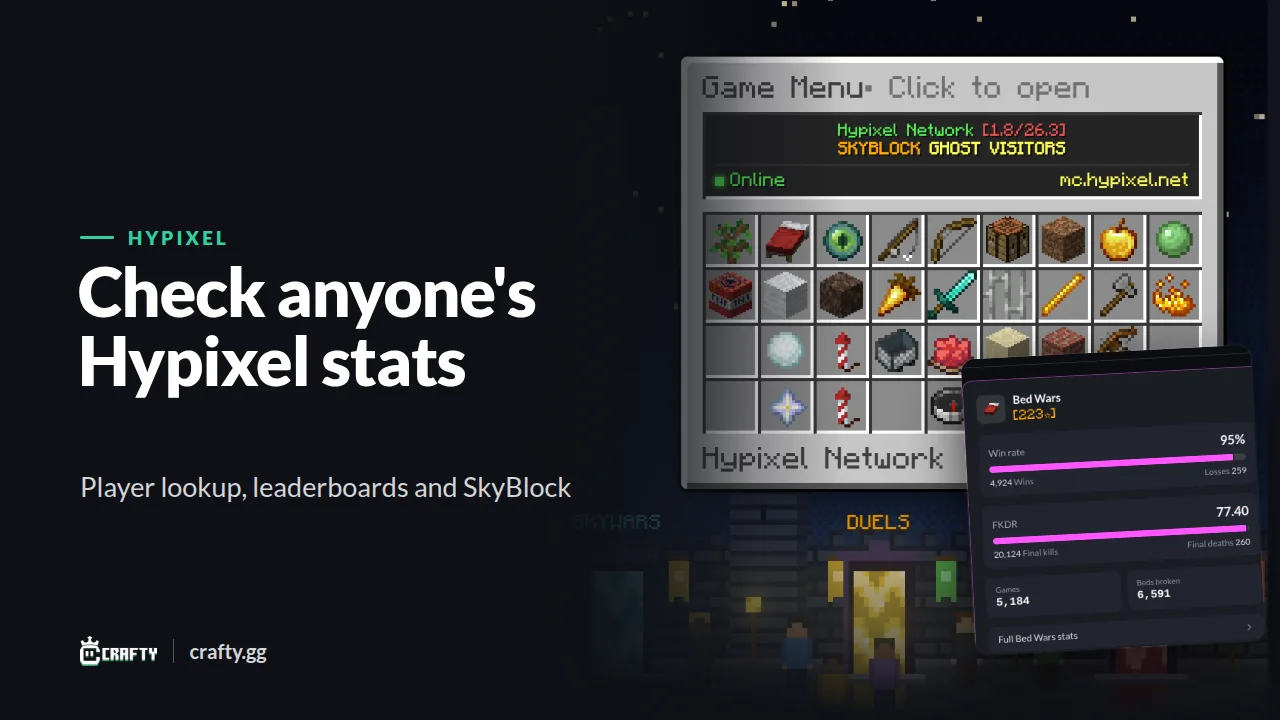
Hypixel is the biggest Minecraft server, and every game played on it ends up in a player's stats: Bed Wars stars and FKDR, SkyWars levels, Duels titles, SkyBlock networth. Hypixel shows some of this in game, but you can't easily look up another player, compare them with the best on the network, or see a whole SkyBlock profile at once. Crafty's free Hypixel stats checker does all of that in a browser. This guide goes through it one page at a time, with annotated screenshots: how to search a player's Hypixel stats, read their profile, find the top Hypixel players in every gamemode, check the live coin boosters, and look up anyone's Hypixel SkyBlock stats.
The Hypixel examples use Technoblade's profile, and the SkyBlock examples use Refraction's. Every stat in the screenshots is real and came from Hypixel's public API.
Quick answer
It's all free, with no account, no mod and no API key to paste in. Crafty asks Hypixel for fresh stats whenever you open a page whose numbers are more than 5 minutes old, and each page says when it was last updated. Crafty isn't affiliated with Hypixel.
The Hypixel stats homepage

crafty.gg/hypixel is built like a Hypixel lobby. The panel on the left holds the Hypixel player search. The Game Menu on the right shows whether mc.hypixel.net is online, how many players are in each game, and which games have a coin booster running. Click any game in the menu to open its page. The menu also links to the leaderboards, the network boosters, Watchdog's ban stats and the guild rankings.
Scroll down and the homepage keeps going:
- Top players: the best players on the network and in Bed Wars, SkyWars, Duels, Murder Mystery, Build Battle, The Pit, Arcade and SkyBlock, one tab each.
- Leaderboards: the top ten on the network level, games played and karma boards, plus a preview of each big game's board and links to every board Crafty keeps.
- SkyBlock: the richest players, the highest SkyBlock levels, the best skill averages, the SkyBlock calendar and live Bazaar prices.
- Featured guilds and Network status: the top guilds, Watchdog's latest bans and the boosters running now.
Step 1: Search a player's Hypixel stats
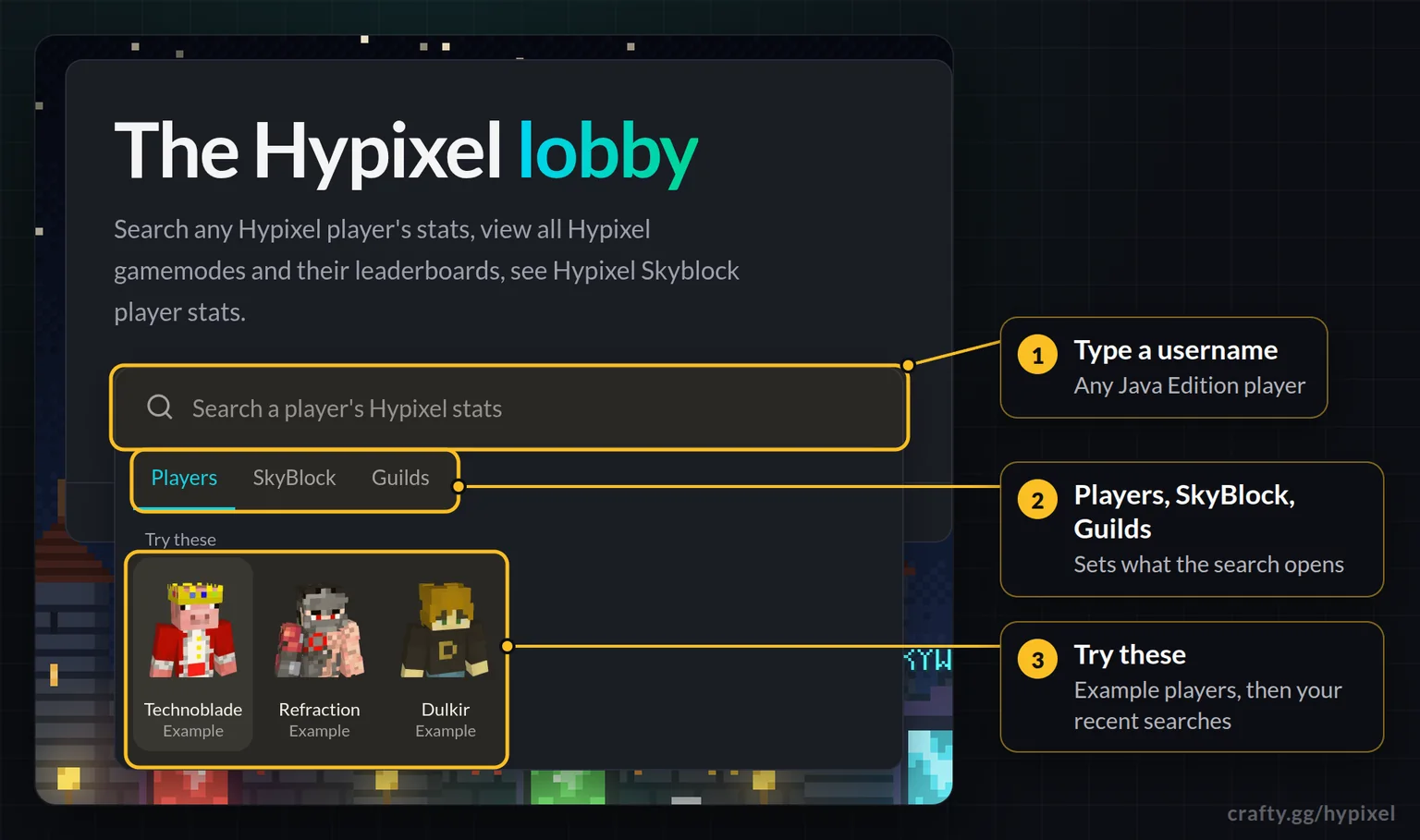
Click the search box and type a Minecraft username. The tabs under it set what the search opens:
- Players opens the player's full Hypixel stats.
- SkyBlock opens their SkyBlock profile instead. There's more on that further down.
- Guilds finds a guild by its name. Type a player's username instead and choose to find the guild they're in.
Your recent searches are kept at the top of the list, so checking the same few players is one click.
There are three other ways into a player's Hypixel stats:
- Go straight to
crafty.gg/@username/hypixel. Add?game=bedwars(orskywars,duelsand so on) to open one game's panel. - Search any Minecraft player in Crafty's player search. Their profile has a Hypixel card with a link to their full Hypixel stats and their SkyBlock stats.
- Use the lookup box on a game page, which shows just that game's stats. That's covered in Step 4.
Search by the player's real Minecraft username. Hypixel ranks that can use /nick play under a fake name, and searching a nick finds nobody, or an unrelated account that happens to own that name.
Step 2: Read a player's Hypixel profile
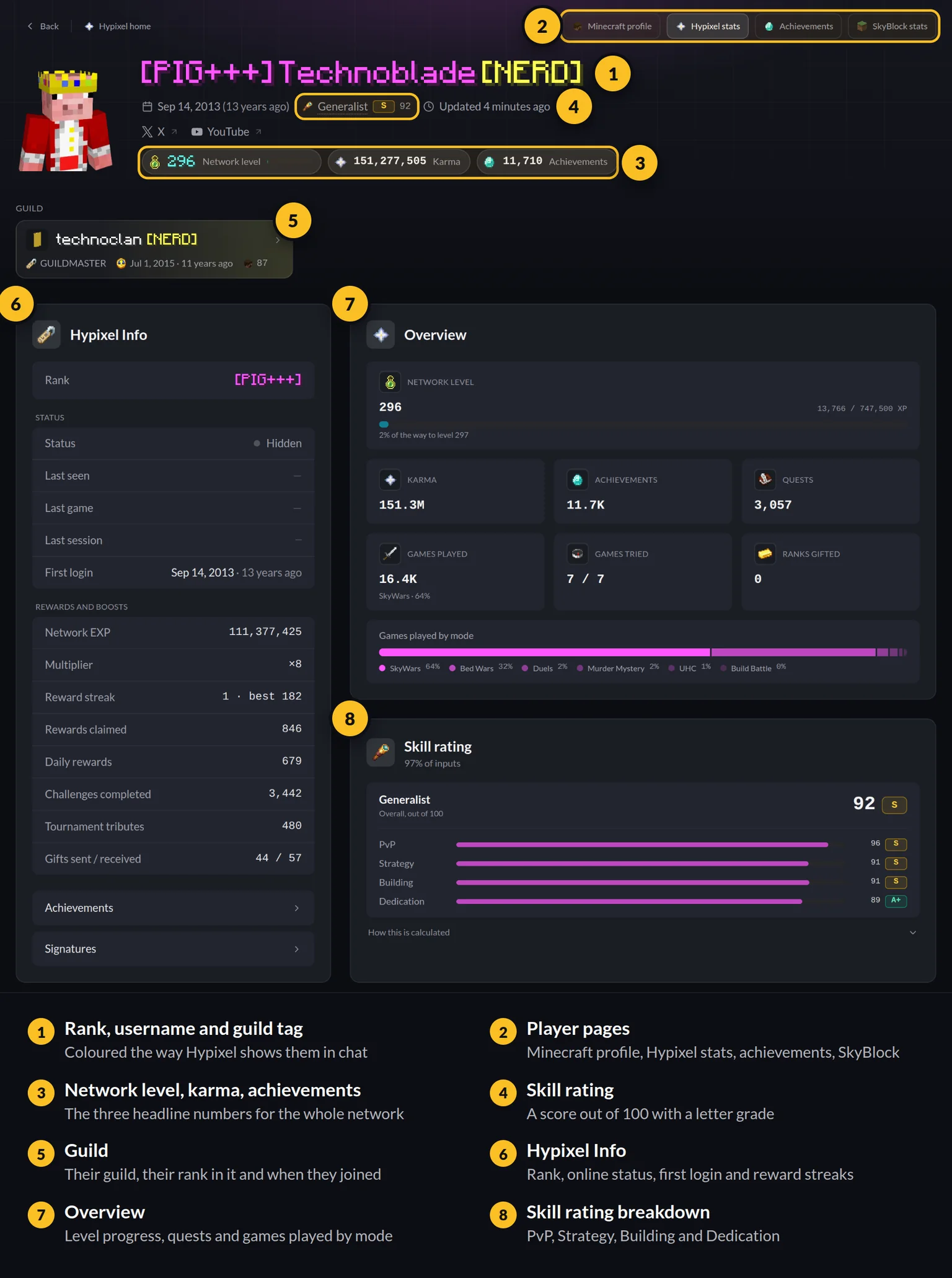
The top of the profile is the player's network-wide Hypixel stats:
- Rank, username and guild tag, coloured the way Hypixel shows them in chat.
- Network level, karma and achievement points, the three numbers most people check first.
- Guild: the guild they're in, their rank in it and the date they joined. Click it to open the guild's page.
- Hypixel Info: their rank, whether they're online and what they're playing, when they were last seen, their first login, and rewards such as their daily reward streak, challenges completed and gifts sent. Players can hide their online status in Hypixel's settings, which is why Technoblade's shows Hidden.
- Overview: progress to the next network level, karma, achievements, quests completed, games played, how many games they've tried, and a bar showing how their games split between modes.
The tabs at the top right switch between the player's Crafty pages: their Minecraft profile (skins, capes and name history), Hypixel stats, their Hypixel Achievements, and SkyBlock stats.
The skill rating
The Skill rating is Crafty's score out of 100 for how good a player is across Hypixel, with a letter grade and an archetype such as "Generalist". It's built from four parts: PvP, Strategy, Building and Dedication, each worked out from the player's ratios in the games they play. Each ratio is compared with an average competent player, who scores 50, while a clearly strong player scores 80. The overall score weights PvP 35%, Strategy 30%, Dedication 25% and Building 10%, and modes with only a handful of games are left out. Open How this is calculated on any profile to see which inputs counted.
Step 3: Check stats for each Hypixel game
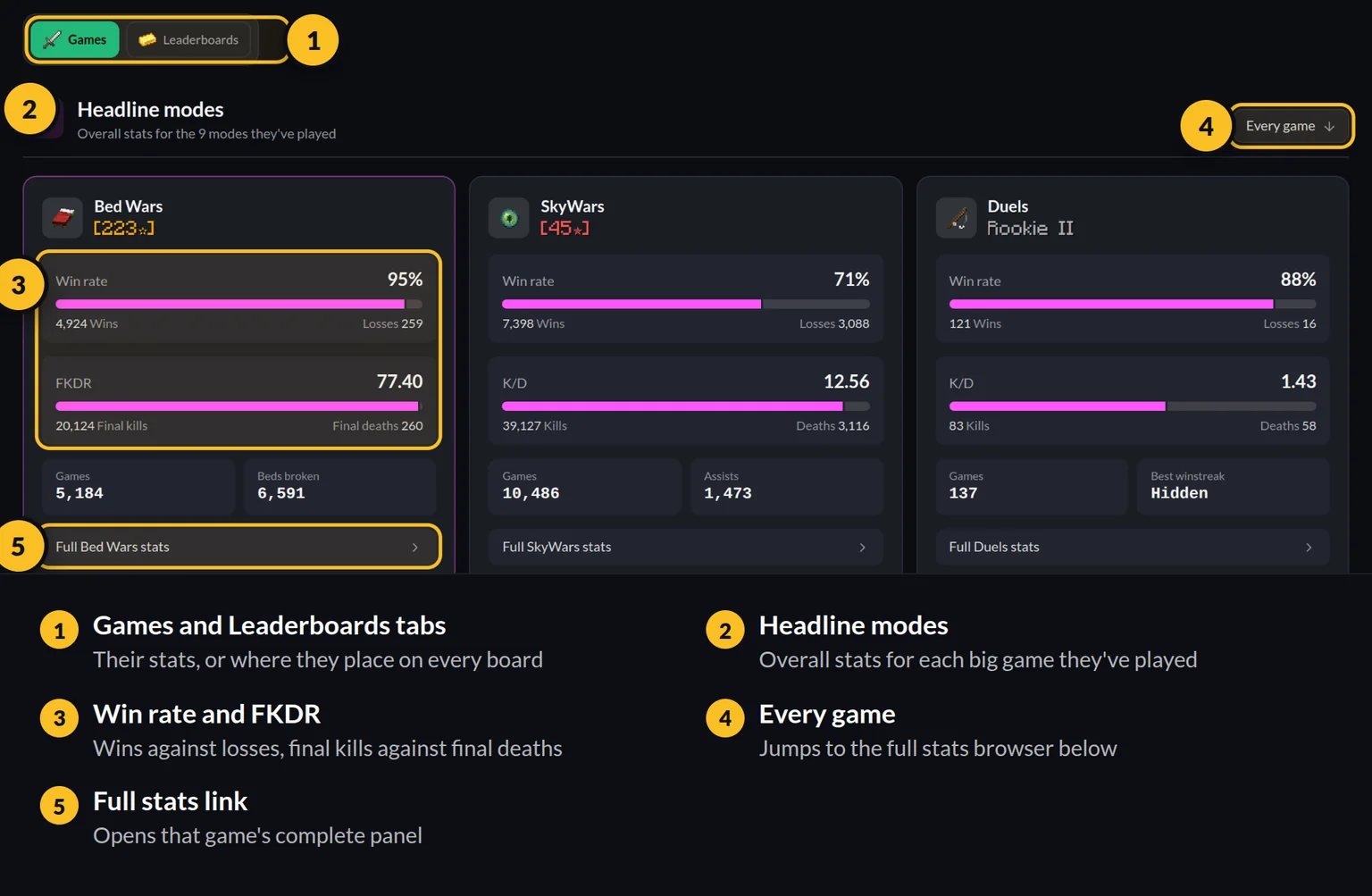
Under the overview, Headline modes gives one card per big game the player has played: Bed Wars, SkyWars, Duels, Build Battle, UHC Champions, Murder Mystery, The Pit, Arcade and TNT Games. Each card has their Bed Wars star, SkyWars level or Duels title, a win rate, the game's main combat ratio, and two more numbers such as beds broken or assists. Full Bed Wars stats (or whichever game) opens the complete panel.
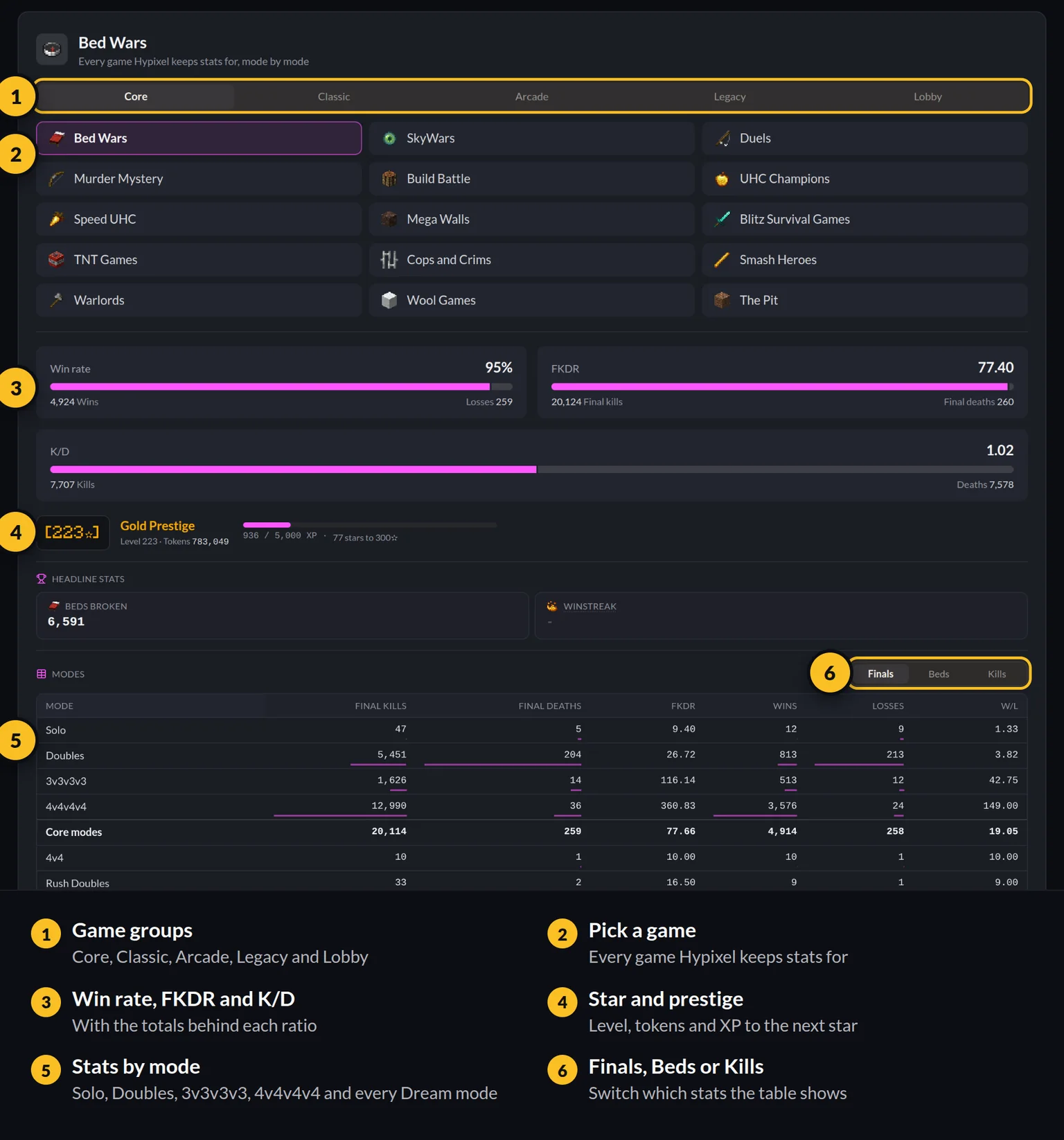
The full stats browser covers every game Hypixel keeps stats for, sorted into Core, Classic, Arcade, Legacy and Lobby. Pick a game and you get its ratios, its level or prestige, its headline stats, and a table of every mode. For Bed Wars that means Solo, Doubles, 3v3v3v3 and 4v4v4v4, then every Dream mode such as Rush, Ultimate, Lucky, Castle, Armed and Swappage, with Finals, Beds and Kills to switch which numbers the table shows.
The stats you'll see most, and what they mean:
Step 4: Look up one game's stats from its game page

Every Hypixel game has its own page on Crafty, such as Bed Wars or SkyWars. The box at the top right, Look up a player's Bed Wars stats, shows only that game's stats, without the rest of the profile. It's the quickest way to check someone's Bed Wars stats before a game. The card that opens shows their star and prestige, their leaderboard places in that game, and a summary of their profile: network level, skill rating, guild, karma, achievements and first login. A place reads "on Hypixel" when the player is in Hypixel's own top 100, and "on Crafty" when it's their place among the players looked up on Crafty, such as Technoblade's "#1,167 of 17.9K on Crafty" for star. Open full profile goes to every other stat, and the full Bed Wars table sits right below the card.
The game page also tells you about the game itself: when it came out, how many modes and leaderboards it has, whether a coin booster is running, how many people play each match, and what each mode is about.
Step 5: See where a player ranks

The Leaderboards tab on a profile lists every board the player is on, across every game: their place, their value and how far they are from the next place up. The summary shows their best place and how many top 10 and top 100 places they hold, and the filter narrows it to one game. Places marked Hypixel are from Hypixel's own top 100, so they're true network ranks. Places marked Crafty rank the player among everyone looked up on Crafty.
Find the top Hypixel players in every gamemode
Hypixel only publishes a top 100 for some stats, and only for a few games. Crafty also ranks every player who has been looked up on the site, which gives a leaderboard for almost every stat and mode on the network: 34 boards for Bed Wars alone, from star and FKDR to beds broken and winstreak.
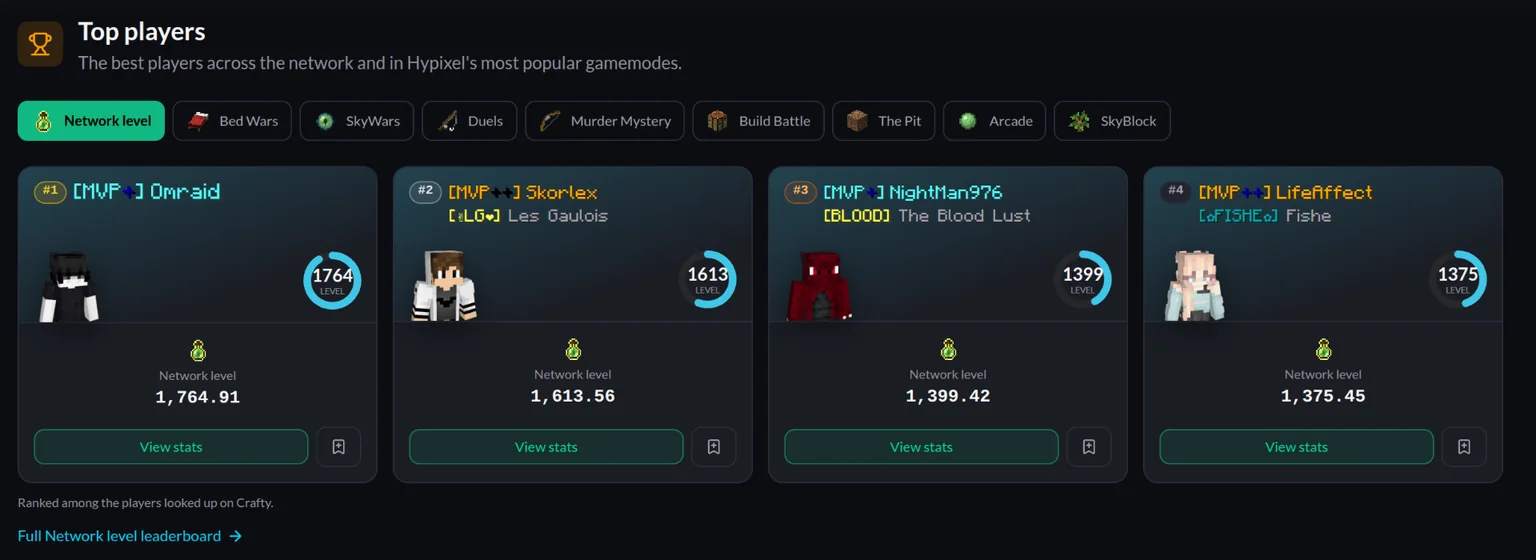
The Top players section of the Hypixel homepage is the quickest overview. Pick Network level, Bed Wars, SkyWars, Duels, Murder Mystery, Build Battle, The Pit, Arcade or SkyBlock to see the top four, then View stats to open any of them.
Every game page then has three ways to find its best players: Top players (record holders, then the top player for each stat), the full leaderboards with a podium and a Find a player search, and modes, which shows who leads each mode's wins.
Top Bed Wars players
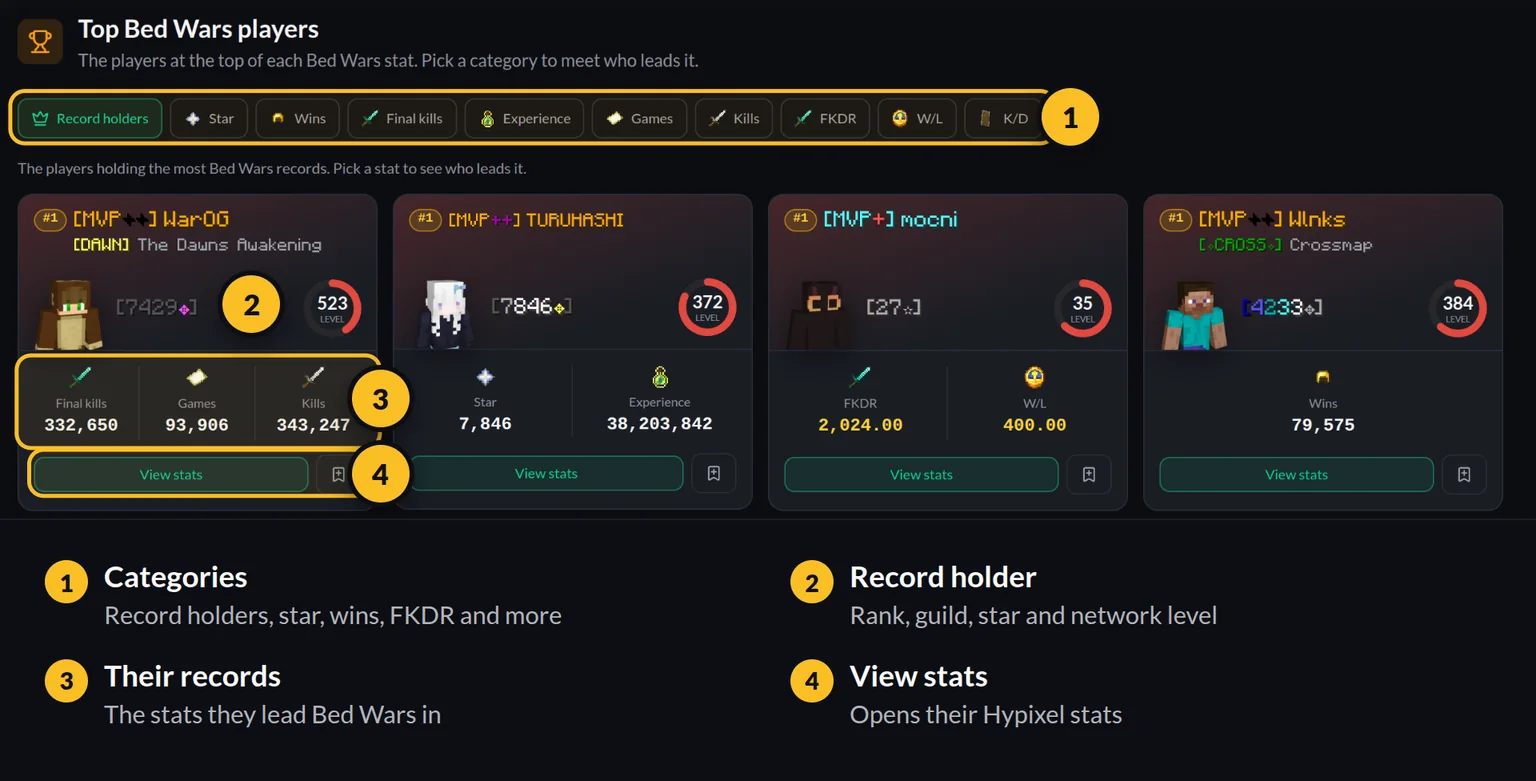
The Bed Wars page opens on the record holders, the players at the top of the most Bed Wars stats. The buttons above them show the top players by star, wins, final kills, experience, games, kills, FKDR, W/L and K/D.
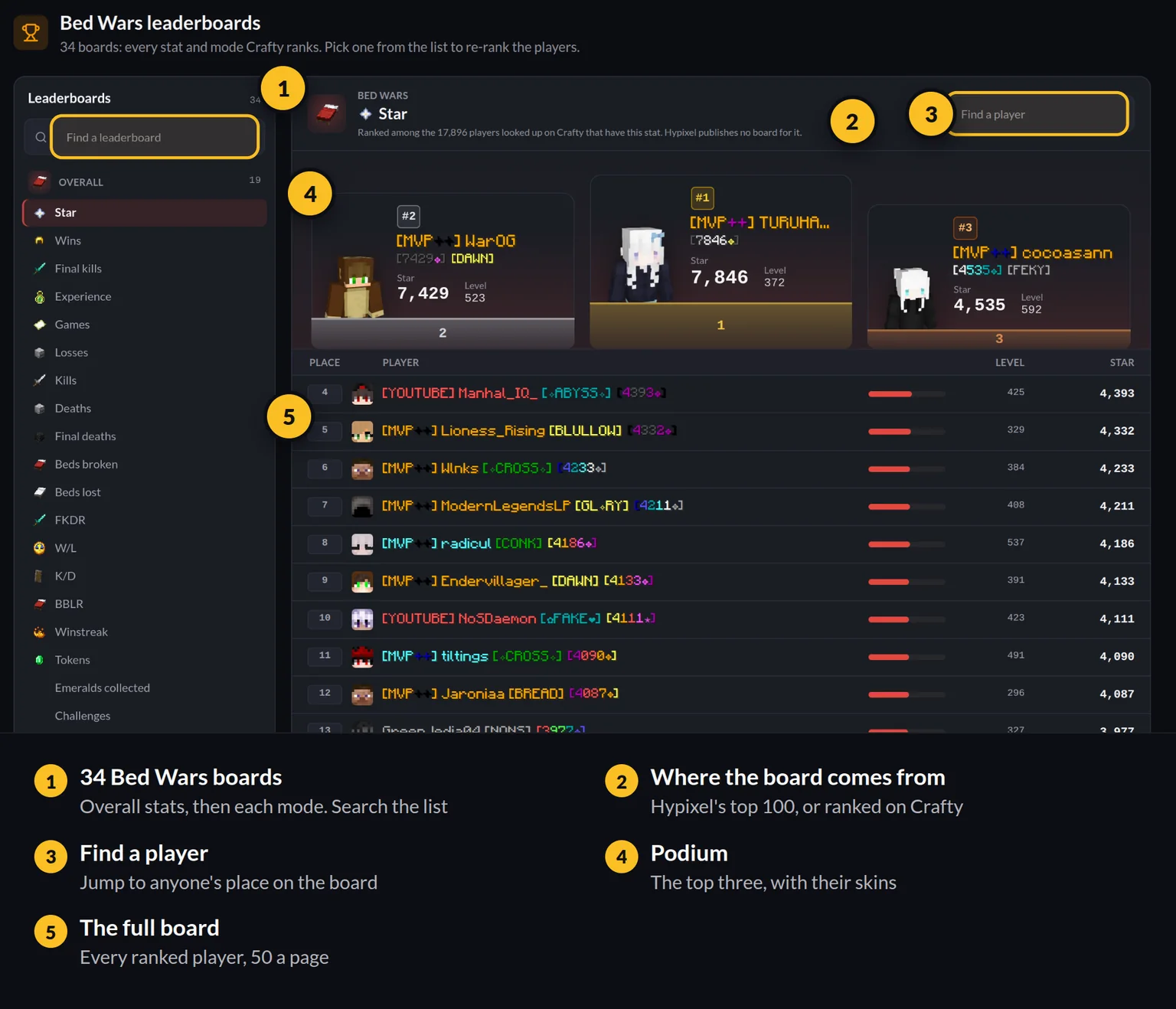
Below that sit the Bed Wars leaderboards. Pick a board from the list on the left: 19 overall boards such as star, wins, final kills, FKDR, beds broken, BBLR and winstreak, then wins, final kills and FKDR for each of Solo, Doubles, 3v3v3v3, 4v4v4v4 and 4v4. Type a username into Find a player to jump to their place on the board. Every board pages through every ranked player, 50 at a time, and each board has its own address, like /hypixel/bedwars/final-kills.
Further down, Guilds behind the Bed Wars board shows which guilds have the most players in the top 100, and Bed Wars modes has the top three in each mode.
Top SkyWars players

The SkyWars page works the same way, with 25 boards: 20 overall boards such as level, wins, kills, experience, games, K/D, W/L, assists and coins, plus a wins board for each mode: Solo Normal, Solo Insane, Teams Normal, Teams Insane and Mini. It's the place to check SkyWars stats against the best players in each mode.
Top Arcade players

Arcade is a whole lobby of minigames, so its page has 29 leaderboards: overall Arcade wins and coins, then a wins board for each minigame. That covers Blocking Dead, Bounty Hunters, Disasters, Dragon Wars, Dropper (with its fastest-run board), Ender Spleef, Farm Hunt, Football, Galaxy Wars, Hide and Seek, Hole in the Wall, Hypixel Says, Mini Walls, Party Games, Pixel Painters, Pixel Party, Throw Out and Zombies.
Every other Hypixel game
Each of these has a page with its own modes, leaderboards, top players and per-game player lookup:
The Classic Games lobby has pages too: Arena Brawl, Paintball, Quakecraft, Turbo Kart Racers, VampireZ and The Walls. So do two games Hypixel has since removed, Crazy Walls and SkyClash, whose stats are still on every player who played them.
Network leaderboards
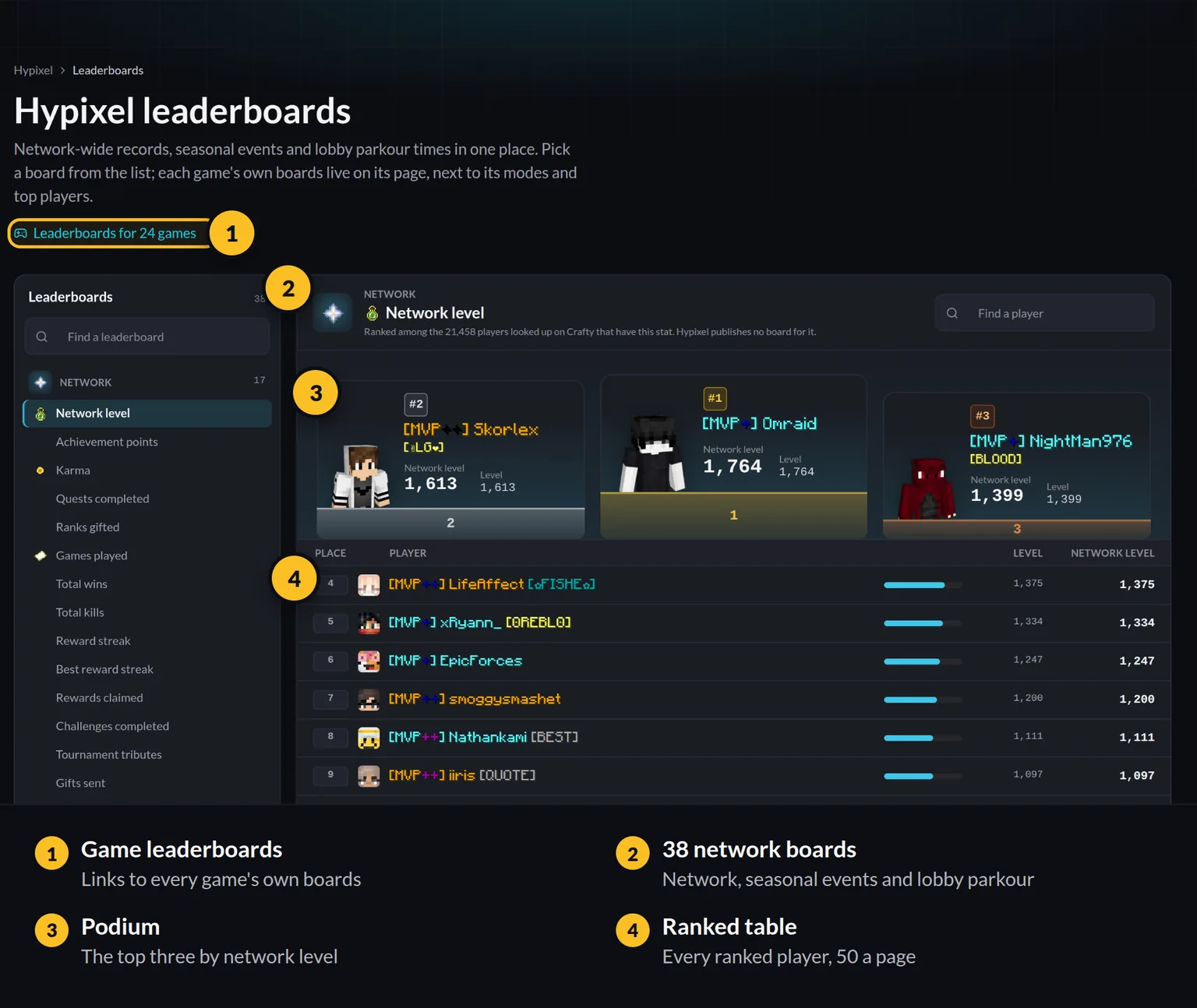
Hypixel leaderboards holds the boards that don't belong to one game. The Network boards rank network level, achievement points, karma, quests completed, ranks gifted, games played, total wins and kills, reward streaks, challenges, coins across games and the oldest accounts. There are also boards for seasonal event experience and silver, and the fastest time on each lobby parkour course.
Discover new Hypixel players
Leaderboards are the obvious way to find good players, but they aren't the only one:
- Record holders and podiums. Every game page starts with the players who hold the most records. Open one, then check their other games.
- Guilds behind each board. Each game page lists the guilds with the most players in that game's top 100, and which of their players are on it. It's a quick way to find a competitive Bed Wars or SkyWars guild.
- Guild pages. Open any guild from Hypixel guilds to see every member grouped by guild rank, the guild's experience over the last seven days and the games it plays most. The guild rankings sort guilds by total and weekly GEXP, members and age.
- Try buttons. Each game page's lookup box suggests a few players to try, picked from the top of that game.
- Crafty's wider player pages. Crafty's player search and the player leaderboards cover Minecraft players beyond Hypixel.
Check live Hypixel boosters and Watchdog bans
A network booster multiplies the coins everyone earns in one game, usually by 2 or 3. Each game runs one booster at a time and the rest wait in a queue. Hypixel network boosters lists every game with one running right now: who activated it, its multiplier, when it ends in your own time zone, who has stacked on it, and how many boosters are queued behind it. Type in Filter games to check a single game. It's worth a look before a long session, since a ×3 booster triples the coins you'd otherwise earn.
Punishment stats shows how many players Watchdog, Hypixel's anticheat, and Hypixel staff banned in the last minute, the last 24 hours and all time, and how those bans split between the two.
How to check a player's Hypixel SkyBlock stats
SkyBlock keeps its own stats, separate from the rest of Hypixel, and a single account can have several SkyBlock profiles. Crafty's SkyBlock stats viewer shows all of them.

Step 1: Search the player on the SkyBlock page
Go to crafty.gg/skyblock, type a Minecraft username and press View stats, or pick one of the example profiles. You can also go straight to crafty.gg/@username/skyblock, or use the SkyBlock tab in the search on the Hypixel homepage. The page opens the profile the player played last.
The SkyBlock homepage is useful even without a username. It has live Bazaar prices for popular items, the current SkyBlock date and time, the next Jacob's farming contests, and the Top SkyBlock players by networth, SkyBlock level, Catacombs level, skill average and slayer XP.
Step 2: Read the SkyBlock profile
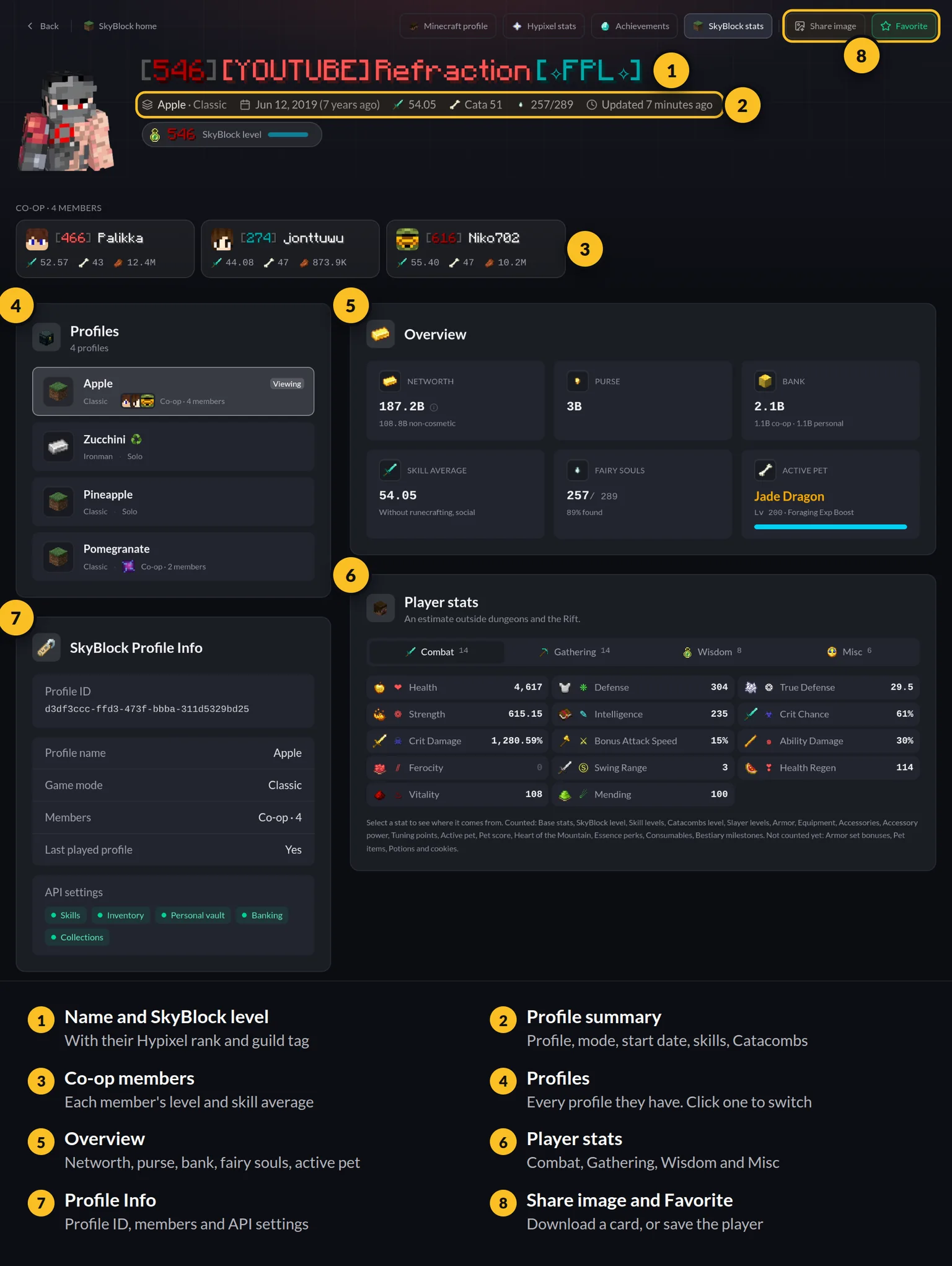
The top of the SkyBlock profile has the numbers SkyBlock players compare first:
- SkyBlock level, the profile's fruit name and game mode (Classic, Ironman, Stranded or Bingo), the date it started, the skill average, Catacombs level and fairy souls.
- Co-op members, each with their own level, skill average and Catacombs. Click one to open their side of the profile.
- Profiles: every SkyBlock profile the player has, with Viewing on the open one. Click another to switch.
- Overview: networth (with the non-cosmetic part shown separately), purse, bank, skill average, fairy souls and the active pet.
- Player stats: an estimate of their Combat, Gathering, Wisdom and Misc stats outside dungeons and the Rift. Select a stat to see where it comes from.
- SkyBlock Profile Info: the profile ID, members, and which API settings the player has turned on.
Share image at the top right downloads a card of the profile, and Favorite saves the player so you can come back to them.
Step 3: Open each section

The tabs below the overview open each part of the profile:
More holds the Museum, the Rift and miscellaneous stats, and the settings button at the end of the row lets you reorder them. Hover over or tap any item for its tooltip, with its lore, enchantments and value.
Why a SkyBlock section says the API is off
Hypixel only shares the parts of a SkyBlock profile the player allows. If a section is empty or says the API is off, the player has turned that setting off. To turn yours on, open the SkyBlock Menu in game, then Settings, then API Settings, and turn on Skills, Inventory, Personal Vault, Banking and Collections. Each profile is cached for about 10 minutes, so the change shows up on Crafty after that.
SkyBlock leaderboards and tools
SkyBlock leaderboards rank the top 50 players by networth, SkyBlock level, Catacombs, skill average and slayer XP, each by the player's best profile.
Crafty also has SkyBlock calculators that work without looking up a profile: the SkyBlock calendar, farming weight, farming fortune, farming rates, greenhouse mutations, the composter and gems.
Common problems
- "Has never joined Hypixel". The account exists but has never logged in to Hypixel, or you searched a nick rather than the real username.
- The stats look out of date. Crafty refreshes a player when their stats are more than 5 minutes old, and SkyBlock profiles about every 10 minutes. Check Updated under the player's name, then reload.
- Online status shows Hidden. The player has turned off their online status in Hypixel's settings. Their stats still show.
- "Hypixel can't be reached right now". Hypixel's API is busy or down. Leaderboards and stats that are already saved keep working, and the rest comes back on its own. Try again in a minute.
- The player is missing from a Crafty leaderboard. Crafty's own boards rank players who have been looked up on the site. Search the player once and they're ranked from then on.
- A SkyBlock section is empty. The player has that API setting turned off. See why a SkyBlock section says the API is off.
FAQ
Is Crafty's Hypixel stats checker free?
Yes. Every Hypixel player stats page, leaderboard and SkyBlock profile is free to view, with no account and no sign-up. Crafty isn't affiliated with or endorsed by Hypixel. The stats come from Hypixel's public API.
How do I check my own Hypixel stats?
Type your Minecraft username into the search on crafty.gg/hypixel, or go to crafty.gg/@yourname/hypixel. To see where you rank, open the Leaderboards tab on your profile.
How do I check someone's Bed Wars stats?
Open the Bed Wars page and type their username into Look up a player's Bed Wars stats. For their full Bed Wars stats with every mode, open crafty.gg/@username/hypixel?game=bedwars.
What is FKDR in Hypixel Bed Wars?
FKDR is the final kill/death ratio: final kills divided by final deaths. A final kill is a kill on a player whose bed has already been broken, so they can't respawn. It's the stat most Bed Wars players use to judge how good someone is, because it rewards winning fights late in a game rather than early.
How often are Hypixel stats updated on Crafty?
When you open a page whose stats are more than 5 minutes old, Crafty asks Hypixel for new ones. SkyBlock profiles are cached for about 10 minutes. Every page shows when it was last updated.
Can I hide my Hypixel stats on Crafty?
Yes. Claim your Crafty profile, then turn off Show Hypixel Stats in its settings. Your Hypixel stats and guild membership stop showing on Crafty.
How do I find a player's Hypixel guild?
Their guild is shown under their name on their Hypixel profile. You can also open the Guilds tab in the Hypixel search, type their username and pick Find the guild they're in.
How do I check someone's SkyBlock networth?
Search their username on crafty.gg/skyblock. Their networth is the first number in the Overview of their SkyBlock profile, and it's priced from the Bazaar and the Auction House. Switch profiles to compare their networth on each one.
What is the Hypixel server IP?
The Hypixel server IP is mc.hypixel.net. The Game Menu on Crafty's Hypixel page shows whether it's online, how many players are in each game, and copies the IP when you click it. Click the server status in the menu to open Hypixel's server page on Crafty.